Short on time?
Pick an AI to summarise this article:
Pick an AI to summarise this article:



Did you notice that the Salesforce Maps app was gone?
Here's the good news, and it's something most vendors won't tell you.
The vast majority of people reading this don't need to do a single thing.
Whether you're one of them comes down to a single number, and you can find it inside your own Salesforce org in about ten minutes. Almost every guide to Salesforce Maps alternatives walks straight past that number and hands you a ranked list of products instead.
So this article covers the part they skip…. What actually retired on 31 August. Who on your team was really using it. What your subscription already replaces for free. What you're paying for now. And the four paths open to you, two of which cost nothing at all.
One thing this article isn't. If you want a Salesforce Maps mobile app alternative compared feature by feature, our field sales mobile app guide does that job properly and this one doesn't try to.
Choosing a Salesforce Maps alternative starts in Setup, not on a vendor website. So that's where we'll start too.
The Salesforce Maps retirement covers two separate things, and most coverage blurs them into one. Keep them apart, because they hit your team in very different ways.
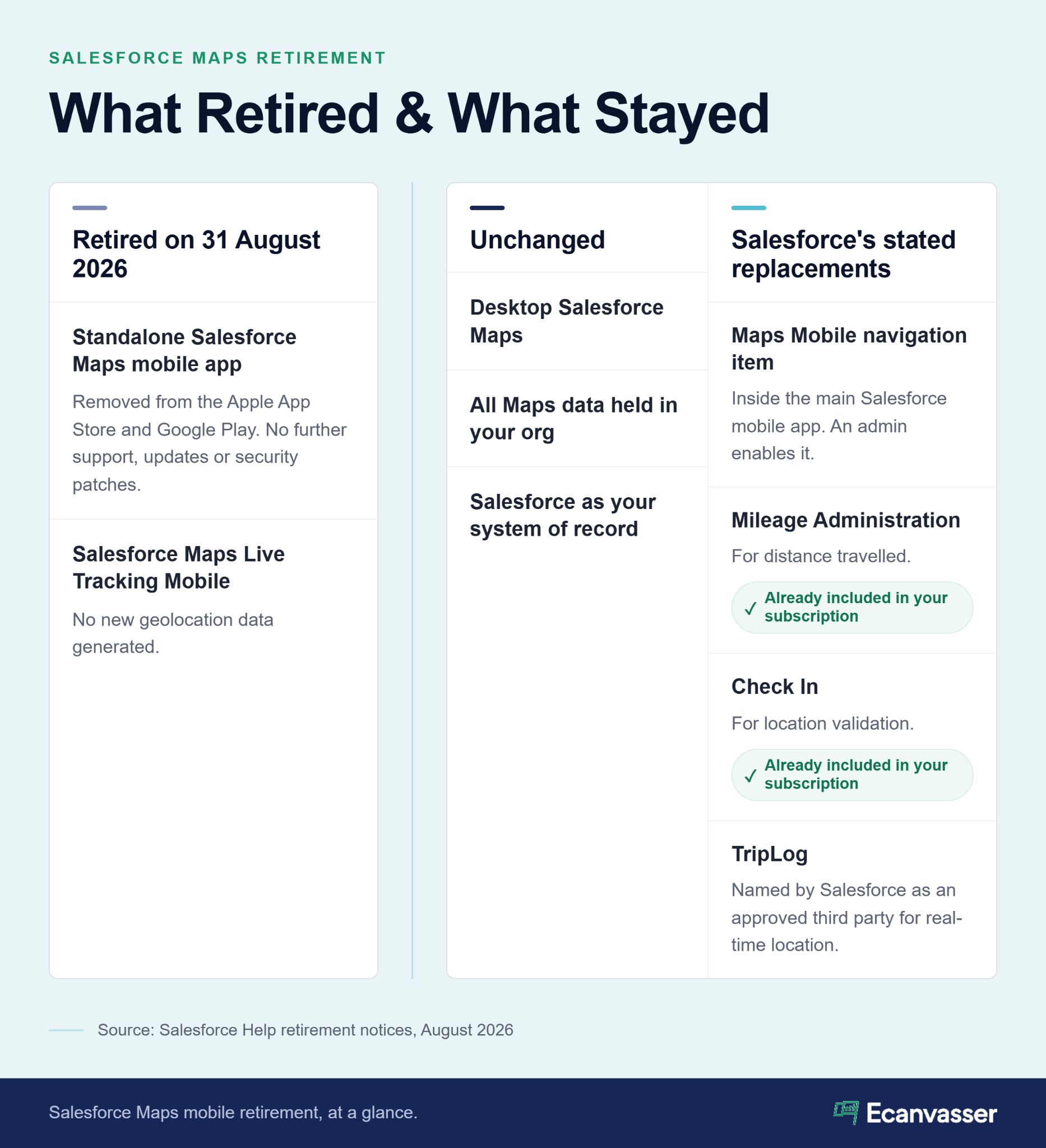
Salesforce Maps isn't being discontinued. Say that out loud if anyone on your team has been told otherwise.
What went on 31 August 2026 was the standalone Salesforce Maps mobile app, the one your reps downloaded from the App Store. It came off Apple's App Store and Google Play and stopped receiving support, updates, and security patches. Installed copies might still open. Salesforce won't promise they'll keep working.
Desktop Salesforce Maps is untouched, and your data hasn't moved. The replacement is a Maps Mobile navigation item inside the main Salesforce mobile app, which an admin switches on in an afternoon.
The retirement reaches six subscription families: Salesforce Maps, Salesforce Maps Advanced, Sales Performance Management, Consumer Goods Cloud, Retail Execution and Industry Cloud Sales.
If you're on Consumer Goods Cloud or Retail Execution, you're in scope. Every article ranking for this term treats it as a Sales Cloud story. It isn't.
The second retirement is the one that actually costs you something.
Salesforce Maps Live Tracking Mobile retired on the same date. Since then, your reps can't generate new geolocation data, so live rep locations no longer update.
The difference matters. The app was a container, and Salesforce rebuilt it somewhere else. Live tracking was a capability, and it's simply gone. Salesforce says it's focusing development inside the Sales Performance Management space, which tells you where this product is heading.
You can't price a replacement until you know how many people were using it. Everyone writing about this retirement skips that step. Don't.
Start with your Salesforce Maps licenses. In Setup, pull the users assigned the Salesforce Maps Permission Set License. That's your bill. It tells you how many seats you're paying for every month.
Now find out how many of those seats did anything at all. Pull the users assigned the Salesforce Maps Live Mobile Tracking permission set license, then report on Maps Live Asset Daily Summary records and check total distance accumulated per rep. Salesforce names both reports in its own retirement guidance.
Two numbers. What you pay for, and what you actually use. The gap between them decides what happens next.
Every team I've seen go through a forced migration starts by pricing the replacement. That's the wrong first move. Find out how many reps opened the thing last quarter. That number tells you whether you're replacing a tool or canceling one.
We’ll make this easy on you.
Don't assume you're in the third group. Go and look.
Before you price a Salesforce Maps replacement, check what your subscription already covers. Every vendor comparison leaves this bit out.
Salesforce names three options in its own Live Tracking retirement notice: Mileage Administration for distance travelled, Check In for validating rep location, and TripLog as an approved third party for real-time visibility. The first two are already included in what you pay.
Mileage Administration covers distance travelled by your reps. It's included, it costs nothing extra, and if your live tracking need was really an expenses question, you've found your answer.
The boundary is worth knowing. This is a record of ground covered, put together after the fact. You can't use it to see where a rep is standing right now. If expense accuracy was the point, you're finished.
Check In confirms a rep was at a location. If your tracking need was really about proving visits happened, this might be the whole answer, and it also costs you nothing extra.
Here's where it stops. Check In gives you a point in time at a place, not continuous visibility across a shift. It won't tell you who started knocking at nine and who started at eleven. If verified activity is load-bearing in how you coach or pay people, that gap is where a free replacement runs out. Real-time field tracking is the same job done by a product built around it.
Geolocation data in your Maps Live Tracking object records stays in your org only while you remain a Salesforce Maps or Consumer Goods Cloud customer. Cancel, and that data leaves with the subscription. Salesforce says so in the retirement notice and tells you to export anything you want to keep beforehand.
That dataset is your record of where your reps went and what they covered. It's the baseline for any coverage analysis you want to run next year. Export it before you cancel, not after you've decided.
Truespeed, a full-fiber broadband provider in the South West of England, ran its field operation on spreadsheets and paper, where data was unreliable and easy to lose. Moving to a centralized record gave their sales and analytics teams the same view, down to conversion rates per door.
Salesforce Maps pricing didn't change on 31 August. What you get for it did.
Salesforce Maps is $75 per user per month. Salesforce Maps Advanced is $150 per user per month. Both are billed annually, and both sit on top of your existing Salesforce license as a Sales Performance Management add-on.
One correction worth making. Several of the articles currently ranking for this term print $125 for Maps Advanced. Salesforce's own pricing page says $150. If you're building a business case for your CFO, take the number from the vendor rather than from a blog.
So what Salesforce Maps costs per user hasn't moved. What moved is what lands on the phone in your rep's hand.
Per-seat pricing has a shape to it. Your software bill tracks your headcount, so every rep you add costs the same as every rep you already have, whether or not they ever open the app.
Go back to your two numbers. A big seat count next to a small active count means you've been paying per seat for people who weren't using the product. The retirement didn't create that problem. It just made you look at it.
"Ecanvasser's real-time tracking completely transformed our field operations. Through the dashboard, we can plan efficient routes, customize interactions, and monitor our canvas stops in real time to support our team the second they need help. The 'verified drops' feature adds an extra layer of accountability, while the reporting tools make it seamless to track hourly visit rates and optimize performance on the fly." Alice Bridge, Web Developer, Triangle Home Services
Route planning, verified activity, visit-rate reporting. That's the list your replacement has to cover, or you need to be honest with yourself that you're letting one of them go.
Most guides to the best Salesforce Maps alternatives for 2026 hand you a ranked vendor list. Here are four paths instead, because the question in front of you isn't which product is best. It's which of these four situations is yours.
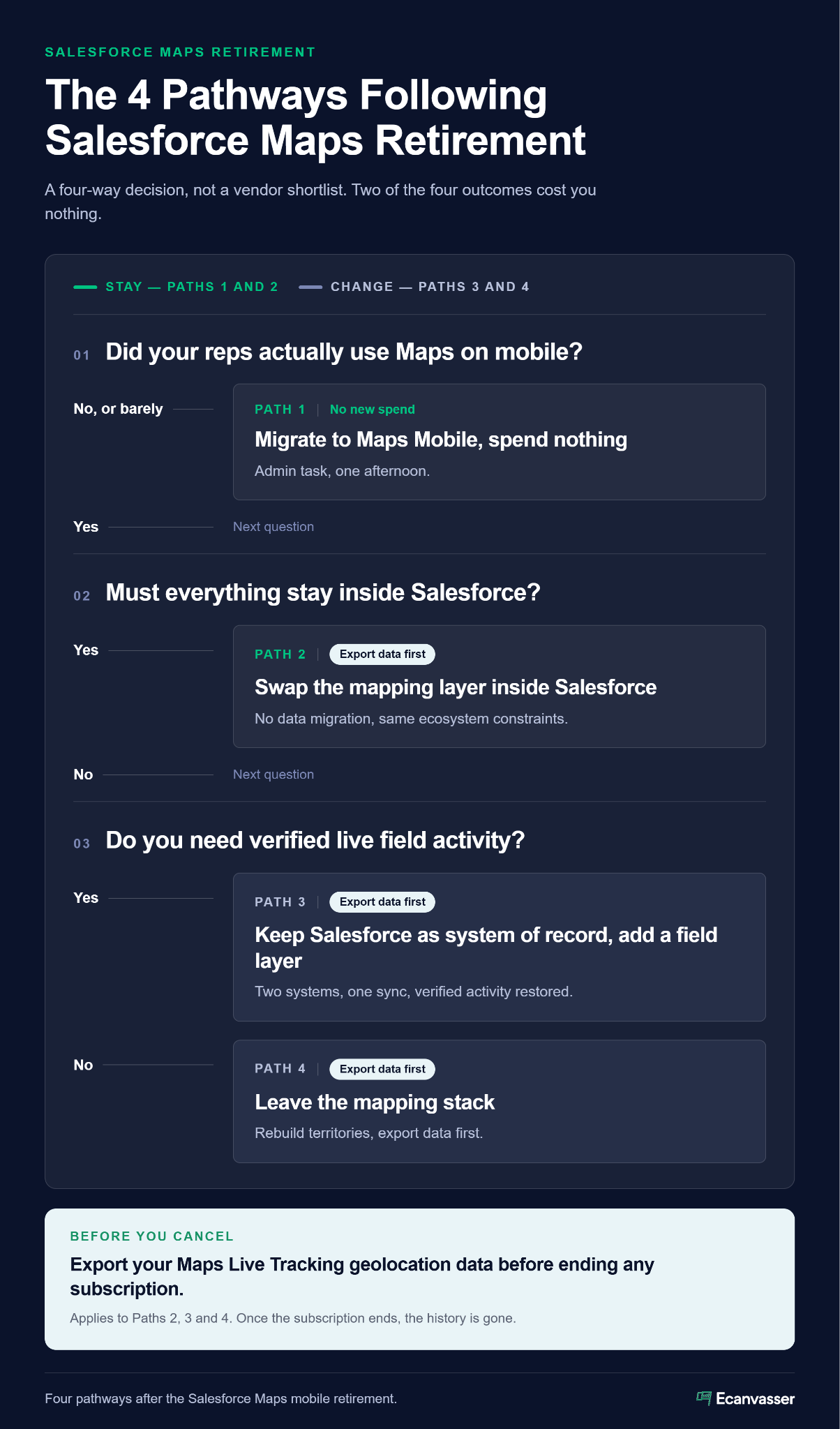
Here’s a quick overview of the four paths, with the best alternatives for each. Don't pick your tool until you know which path is right for you. We cover your four strategic options in detail below.
Badger Maps is excellent at sequencing a driving day and has no door-level territory assignment. Maptitude is a desktop GIS tool your ops team will love and your reps will never open. Neither is a flaw. They're just answers to a different question than the one you're asking.
If you want these compared properly, feature by feature, the field sales mobile app guide does that across seven of them.
Keep scrolling to figure out your best path forward.
Add the Maps Mobile navigation item and get on with your day.
This is an admin task, not a project. No procurement cycle, no security review, no rollout plan to write up.
It fits you if your reps visit a handful of booked accounts by car, if you never leaned on live tracking, and if your usage report came back steady but modest.
If that's you, stop here and spend nothing. Send this to whoever asked you to evaluate alternatives and get your afternoon back.
You want the mapping. You don't want to leave Salesforce. The idea of a second platform makes your admin visibly tense.
Salesforce-native mapping tools install from AppExchange and read your existing objects directly, so there's no data migration and no second login. Geopointe is where most teams in this position land, at a comparable price.
The trade-off is that you inherit the constraints you already had. No prospecting layer. A mobile experience tied to Salesforce mobile infrastructure. Total dependence on staying with Salesforce, which is fine right up until it isn't.
Salesforce Maps territory planning stays on the desktop either way, so the only real question is where the mapping layer lives. This path fits you if that planning is a desk job for your ops team rather than a capture job for your reps.
Replacing Maps doesn't mean migrating your CRM. This one assumption costs teams more time than any other part of the decision.
The split is clean. Your CRM holds the customer, the deal and the history. A field platform holds what happened in the field. The two sync, so nobody types anything twice, and Salesforce stays your system of record.
The assumption I hear most often is that replacing Maps means a CRM migration, and it almost never does. Your system of record and your system of execution were always two different jobs. The retirement just made that visible.
This path fits you if your usage report showed real activity across the team and verified tracking mattered to how you manage it. That capability isn't coming back through any Salesforce route, and waiting won't change it.
Some of you will conclude that Maps was solving a problem you no longer have, or that your field motion outgrew a mapping add-on two years ago.
Rebuilding in dedicated field sales mapping software means your territory boundaries move too. They rarely transfer cleanly, so budget time for redrawing them. Export your Live Tracking data first. Run both systems side by side for a fortnight before you cut over. Territory mapping and route planning both have to exist somewhere on the other side.
"The system set up was simple and support provided by Aoife was excellent making the entire set up seamless. We have been able to tailor the software to suit our needs which has been very beneficial to our business." Anthony Johnston, General Manager, HTC Foods
The configuration worry is almost always bigger than the configuration.
We built Ecanvasser for a particular kind of team, and you deserve to find out quickly whether you're one of them.
Paths three and four, for teams running residential field sales at scale. Broadband, home improvement, solar, home services, pest control.
Pricing is by lead volume rather than per user, the exact inverse of the model you've spent the last few minutes reading about. Add fifteen reps for a summer push and your software bill stays where it is. It's also the difference that comes up most when teams compare us against SPOTIO. Salesforce stays your system of record, and verified field activity, territory assignment and routing sit in one system instead of three.
That's the fit, and it's narrower than most vendor pages will admit to.
Our tool might not be the best choice for your company.
Here are four legitimate reasons why Ecanvasser would be the wrong Salesforce Maps alternative for you:
The teams we are the wrong answer for usually work it out on the first call, and I would rather they did. If your reps are driving to six booked meetings a day, a routing tool will serve you better than we will.
{{faq-1}}
{{faq-2}}
{{faq-3}}
{{faq-4}}
Run the usage report. Check what your subscription already covers. Price the gap. Then pick your path.
Two of those four paths cost you nothing. If the numbers send you down path one, take it and move on.
Still weighing the apps themselves? Our field sales mobile app guide compares seven of them against five criteria.
Ready to see what path three costs? Our pricing is public, and you can start a free trial without talking to anyone.
No. What retired on 31 August 2026 was the standalone Salesforce Maps mobile app, which came off the App Store and Google Play and no longer gets support or security updates. Desktop Salesforce Maps carries on unchanged, and mobile access moves into the main Salesforce mobile app through a Maps Mobile navigation item your admin switches on.
Salesforce Maps is $75 per user per month and Salesforce Maps Advanced is $150 per user per month, both billed annually as a Sales Performance Management add-on on top of your existing Salesforce license. The price didn't change with the retirement. Several comparison articles still print $125 for Maps Advanced, so check Salesforce's own pricing page before you build a business case on that figure.
Nothing replaces it exactly. Salesforce points you to two features already inside your subscription: Mileage Administration for distance travelled, and Check In for confirming a rep was at a location. It also names TripLog as an approved third party. If you need continuous visibility across a shift rather than a point-in-time confirmation, you'll need a dedicated field platform.

Ecanvasser’s real-time tracking completely transformed our field operations. Through the dashboard, we can plan efficient routes, customize interactions, and monitor our canvas stops in real time to support our team the second they need help. The "verified drops" feature adds an extra layer of accountability, while the reporting tools make it seamless to track hourly visit rates and optimize performance on the fly.




Scale your operations, empower your reps, and deliver predictable, profitable growth with Ecanvasser.