Short on time?
Pick an AI to summarise this article:
Pick an AI to summarise this article:



Sales capacity planning means working out how much your team can sell in a period and how many reps you need to hit your target. For door-to-door and other field teams, physical limits set that number. Those limits include the hours reps spend knocking, how close together the homes are, how many people answer, and how much daylight the season gives you.
That’s why field sales capacity planning is a very different exercise compared to the quota math inside sales teams use.
You may have seen what happens when a plan leaves those limits out. The target goes up, and you add five reps. A few months later, sales are flat because the new reps are knocking on streets covered the week before. You’re then dealing with a shortage of homes to knock, but it's easy to mistake that for a shortage of reps.
The first capacity plan I trusted was built from a week of door logs, and it showed we were short on workable turf. Hiring more reps would have made that worse.
If you run sales operations for a field team, your capacity plan drives your hiring and territory decisions, so build it from real field data.
Here’s how to do this right.
Sales capacity is the number of sales your team can realistically deliver in a period. It depends on how many reps you have, how far along each one is in learning the job, and how much each person sells.
The standard formula is:
Sales capacity = number of ramped reps × individual target × average attainment
A ramped rep is one who has finished the learning period and is selling at full output. Average attainment is the share of their individual target that your reps actually hit, on average.
Planning guides adjust the formula in two ways. New hires count as a fraction of a rep until they're fully up to speed, and reps you expect to lose come off the total. For example, you might start a quarter with 20 ramped reps, add two new hires at half output each, and expect one rep to leave. That gives you 20 + 1 − 1, or 20 rep-equivalents, which means the output of 20 fully ramped reps.
This formula works well when a rep's available time is the main limit on output, as it usually is in inside sales. For door-to-door teams, the bigger limits are physical, and your capacity plan has to start from field activity to account for them.
An inside rep who falls behind can stay an hour later and make 30 more calls. A field rep can't extend the daylight or add more homes to a street, and they can only talk to the people who are home. Four limits decide how much a field rep can sell, and you can measure each one from your reps' activity data.
A six-hour shift includes travel to the territory, driving between areas, breaks, and end-of-day admin. Once you take out 90 minutes of travel and breaks, your rep has four and a half hours of actual knocking.
In this guide, hours at the door means the time from a rep's first logged door to their last, minus breaks and drives between areas. Measure it from door logs, because clock-in times include travel and make your plan look more generous than the shift really is.
Compact territories and good route planning protect these hours, since every 20 minutes a rep spends driving is 20 minutes with no doors knocked.
Doors per hour depends on how close together the homes are. A rep working townhouses or apartment blocks can knock far more doors in an hour than a rep working rural properties with long driveways.
Contact rate is the share of doors where your rep actually speaks to someone, calculated as conversations divided by doors knocked. It changes with who's home, so weekday afternoons, early evenings, and Saturday mornings can give very different results on the same street.
Because of this, one team-wide average can mislead you. A dense urban territory can produce more conversations in three hours than a rural territory does in a full day. Split your model by territory type and time of day before you average anything. If you don't, a rep who moves from city streets to a rural area will appear to be underperforming.
If your reps close at the door, you need one conversion rate: sales divided by conversations. If you sell in two steps, as solar and home improvement teams commonly do, you need two rates. One covers conversations to booked appointments, and the other covers appointments to closed deals.
Base these rates on the last 60 to 90 days of your own results. Calculate them separately for new and experienced reps, so early mistakes from new hires don't pull down the number you plan on. Don't plan on your best rep's close rate either, since a target built on it is one only that rep can hit.
Daylight and weather change how many hours your reps can knock, so plan capacity month by month. A yearly average hides the winter months when output drops.
The seasonal difference is large. In Chicago, the June 2026 solstice has 6 hours, 6 minutes more daylight than the December solstice. In London, the longest day of 2026 has 16 hours, 38 minutes of daylight, and the shortest has 7 hours, 49 minutes.
Next, subtract the days your team usually loses to bad weather, using your own shift history for your region. Then take out holiday weeks, when fewer people want a knock at the door.
I plan winter capacity as its own season. When sunset moves earlier than 5 p.m., I'd rather lower the January target than watch good reps miss it for reasons they can't control.
A home security team in the north of England ran the same 25-rep plan all year. When the clocks went back, their best time to reach people (the early evening) shrank by more than an hour. Weekly sales fell by about a fifth. The team kept its headcount the same, moved two shifts to Saturday daytime, and lowered winter targets to match the shorter days.
A sales capacity model for a field team multiplies five numbers you likely already collect:
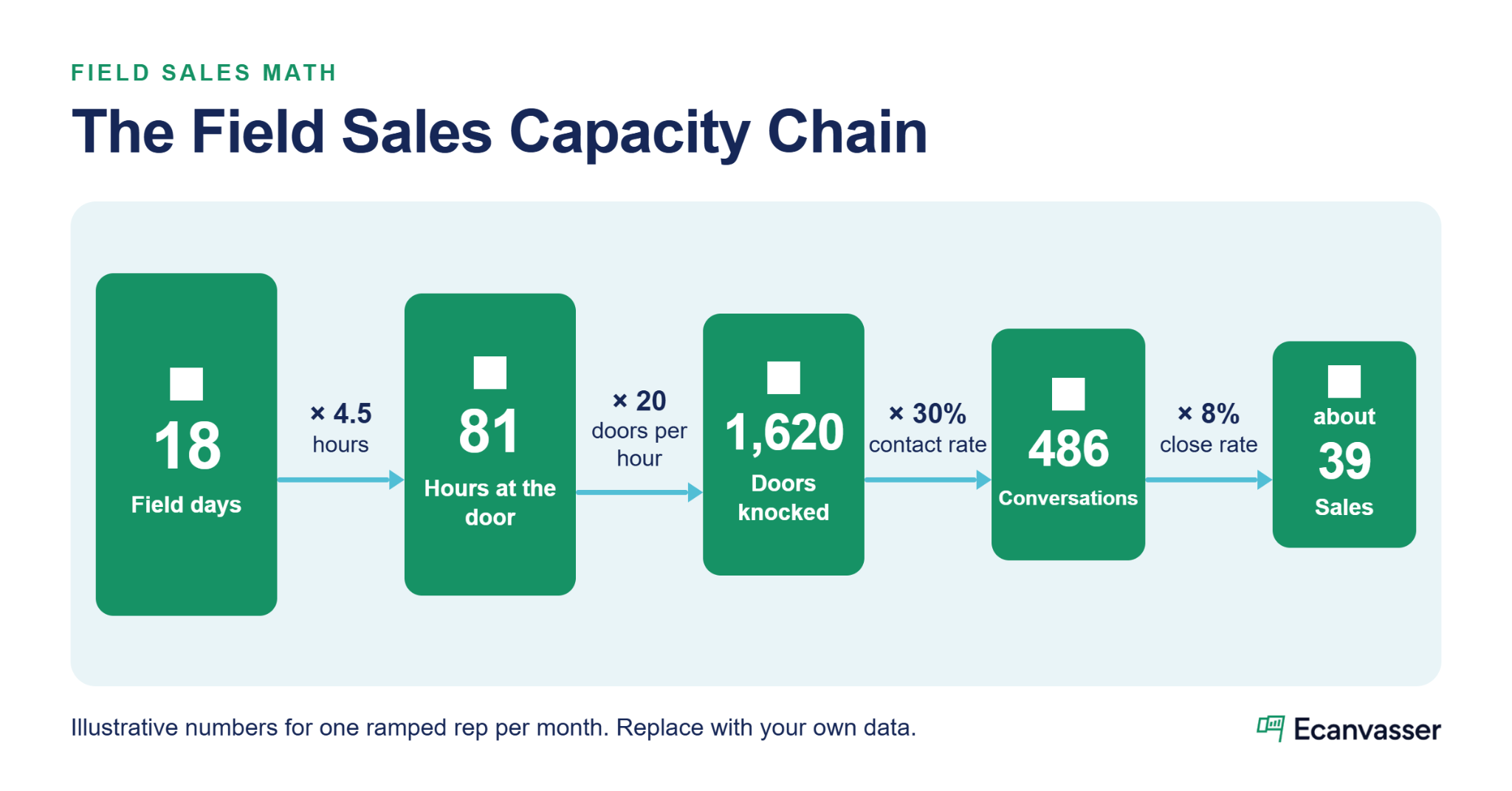
Field days × hours at the door × doors per hour × contact rate × close rate = sales per rep
Multiply the result by the number of ramped reps to get your team's capacity. If your reps log every door in a field app, most of these inputs are already in your reports.
You can source each input from your field records:
GPS-verified activity from real-time field tracking shows when reps actually started and stopped knocking. Dashboards and reports break each rate down by rep and territory. Our guide to field sales analytics covers which metrics to watch week to week.
Use 60 to 90 days of history, and leave out each rep's first two weeks so their learning period doesn't distort the averages.
"When reps collect data at the door through the app, it's clean, structured, and instant. You get consistent, usable data captured the first time." - Aoife Murphy, Customer Success Manager, Ecanvasser
Copy this sales capacity planning template into a spreadsheet and replace each example value with your own numbers. The example values are for illustration only.
In the example, 18 days × 4.5 hours × 20 doors per hour gives 1,620 doors a month. A 30% contact rate turns those into 486 conversations, and an 8% close rate turns those into about 39 sales per ramped rep.
At the team level, a target of 900 sales a month needs about 23 ramped reps. You'll need more than that once you account for new reps at half output and the reps who leave during the year.
The example uses a pace of 90 doors a day, and you may coach your team toward a higher number.
"I always tell customers to work a territory efficiently. Have reps knock 120+ doors a day. That is the proven method that is repeatable and easy to train." Thomas Hollingsworth, Enterprise Account Executive, Ecanvasser
Ecanvasser's pricing page calculator treats 60 doors a day as relaxed, 90 as typical, and 120 as high pace. Plan on your team's typical pace, and use the higher pace as a coaching goal.
To keep territory ownership alongside these numbers, pair this template with our free sales territory planning template.
Run your numbers in two directions. A top-down check divides your revenue target by sales per rep to show how many reps the target requires. A bottom-up check adds up what your current reps and planned hires can produce each month, including ramp time and expected departures.
The difference between those two results is the most useful output of a sales capacity planning model. Discuss it with finance before the year starts, while you can still move hiring dates or adjust the target.
Field teams also need a third check: whether your territories hold enough workable doors to support the bottom-up number at your revisit cadence. If they don't, extra reps will add knocks without adding sales.
To estimate how many households a team your size can cover, use the coverage calculator on Ecanvasser's pricing page.
Your reps can only sell to the homes in their territory. That means field capacity is the lower of two numbers: how many doors your reps can knock, and how many doors your territories can supply.
To estimate supply, divide your workable doors by your revisit cadence in weeks:
Workable doors ÷ revisit cadence (in weeks) = doors available per week
A territory with 6,000 workable homes and a four-week revisit cycle supplies about 1,500 doors a week. If its reps can knock 2,500 doors a week, about 1,000 of those knocks will hit homes visited too recently or stray into other territories.
The signs usually show up in the field before anyone checks the numbers. Reps knock again on homes that said "not interested" the week before, drift into neighboring territories, and see their contact rates fall. Coaching won't fix contact rates that fall for this reason, because the cause is too many reps for the doors available.
Good sales territory management keeps that supply visible, and careful sales territory planning sets it up from the start. In Ecanvasser, territory management and time-bound lists control which reps can see which doors, and when.
One fiber team put 14 reps on a new-build area of about 6,000 serviceable homes. After two full passes, the area was fully covered within five weeks, and reps began knocking again on doors that had already said no. The team set a 30-day revisit rule and moved four reps to the next build area.
New field reps reach full output in days and weeks, much faster than the three-to-nine-month ramp periods used in SaaS planning guides.
With a good onboarding process, a rep is ready to work the field in a day or two. Their door pace and close rate then keep improving for several weeks. To build a ramp factor, compare each new rep's weekly sales in weeks one to eight with the weekly sales of a ramped rep. Your 30-60-90 day sales plan can set checkpoints for that period.
Rep turnover cuts field capacity more than your headcount suggests. When an experienced rep leaves, you lose their full output, and their replacement starts at a fraction of it while learning the job. If your turnover is high, plan to hire steadily throughout the year. Our guide to sales rep turnover covers why field reps quit and what to fix first.
"Constantly hire. Door to door can be a revolving door, so keep hiring all the time." Thomas Hollingsworth, Enterprise Account Executive, Ecanvasser
Triangle Home Services built a door-to-door program from scratch and canvassed more than 20,000 homes in just over a month. The company hired and deployed a full team while its software costs stayed flat. Its managers tracked hourly visit rates against targets to measure each rep's output. Triangle now plans to use the same approach in a new market.
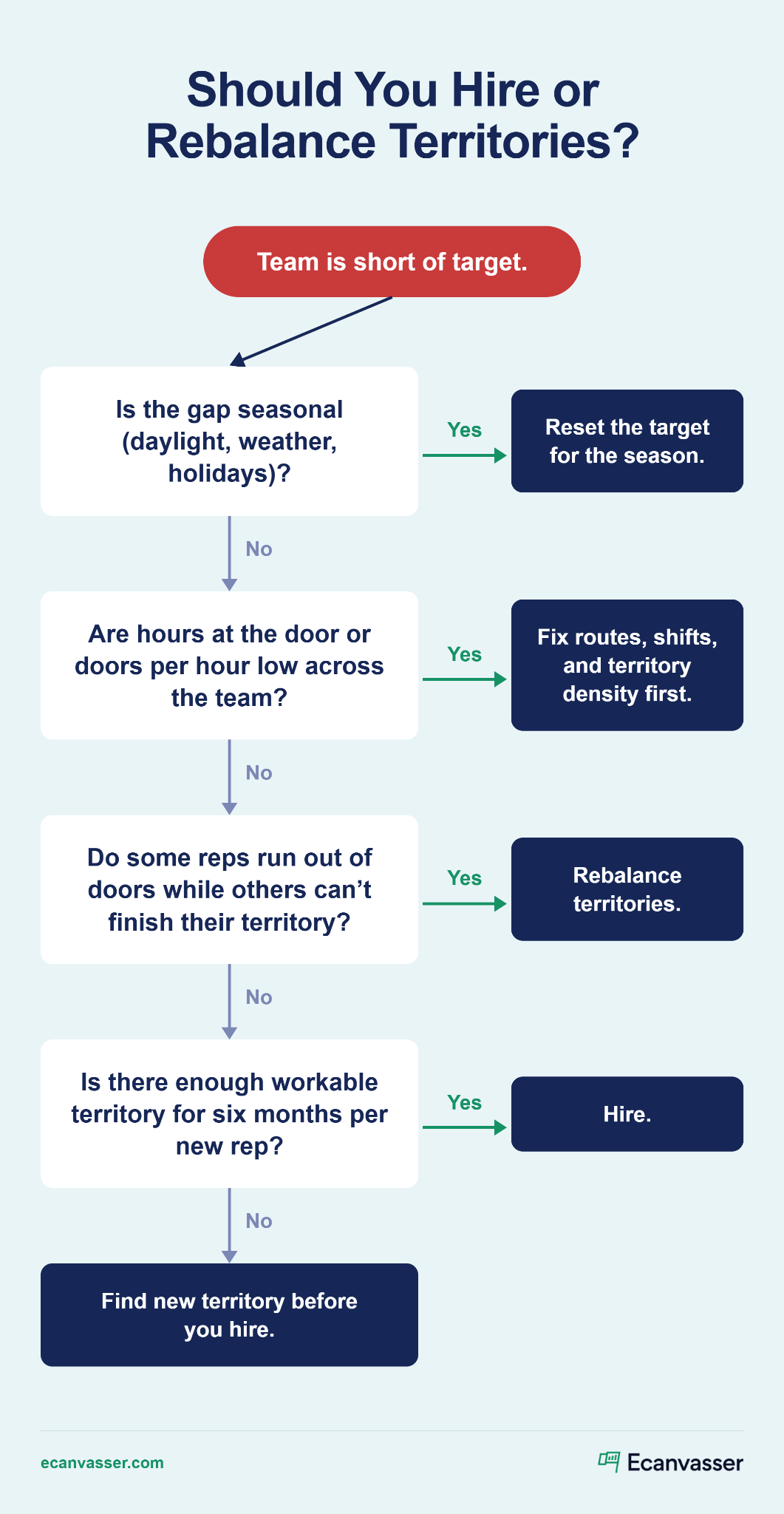
Your capacity model should help you decide whether you need more reps or better use of the reps you have.
For sales headcount planning, check these four options in order, starting with the cheapest:
Software pricing can also affect the hiring decision. With per-user pricing, every new rep raises your software bill. Ecanvasser includes unlimited users and charges by the territory you cover, so adding a rep doesn't change your bill. You can see the details on Ecanvasser's pricing page.
If you're adding a second region or another layer of managers, our guide on how to structure a sales team covers multi-region growth.
Before I approve a new hire, I ask whether that rep will have six months of doors to knock. If the answer depends on taking turf from another team, the request waits.
Panda Recycling faced a high-demand period with overlapping coverage and limited visibility into field activity. The team used Ecanvasser's mapping and real-time tracking to quickly reorganize territories and reassign agents. That reduced overlap, improved coverage, and sped up response times.
Field conditions change through the year, so refresh your model's inputs every month and re-run the full plan every quarter. Update it straight away after a month with heavy rep turnover, when you add a territory, or when the season changes.
These three numbers show when your plan is falling out of date:
When your reps log activity in Ecanvasser, GPS, interaction, and outcome data feed straight into these numbers, and your plan updates from real shifts.
To optimize your sales team, start a free trial of Ecanvasser.
{{faq-1}}
{{faq-2}}
{{faq-3}}
{{faq-4}}
{{faq-5}}
Want to see how Ecanvasser can help you transform your field team? Check out our features for territory management and route planning.
Start with sales per ramped rep by multiplying field days per month by hours at the door, doors per hour, contact rate, and close rate. Multiply that by your ramped reps, count new hires as a fraction of a rep until they're up to speed, and subtract expected leavers. Finally, check that your territories can supply enough doors at your revisit cadence.
A sales capacity model is a spreadsheet or tool that uses your activity and conversion data to forecast what your team can sell. It shows how many reps your target requires, when to hire them, and where the plan falls short. For field teams, it should include hours at the door, contact rate, and territory supply, along with ramp time and turnover.
It depends on how close together the homes are, how long the shift is, and how long each conversation takes. Ecanvasser's pricing calculator treats 60 doors a day as relaxed, 90 as typical, and 120 as high pace. Measure your own team's pace over 60 to 90 days, plan on the typical number, and coach toward the higher one.
Refresh the inputs monthly and re-run the full plan every quarter. Update it immediately after a month with heavy turnover, a new territory, or a seasonal drop in daylight. A plan you set once a year won't reflect the shorter hours your reps have in winter.
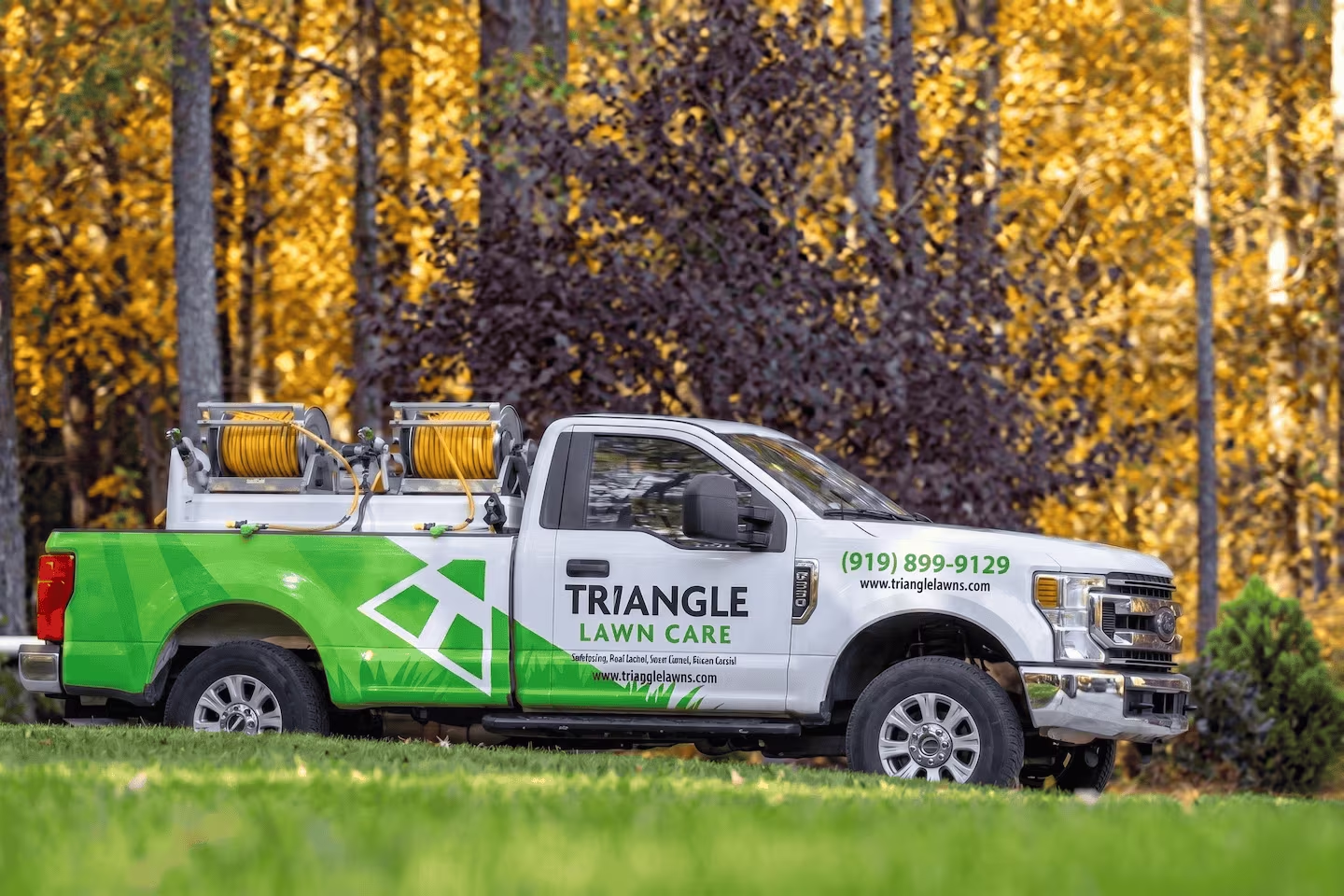
Ecanvasser’s real-time tracking completely transformed our field operations. Through the dashboard, we can plan efficient routes, customize interactions, and monitor our canvas stops in real time to support our team the second they need help. The "verified drops" feature adds an extra layer of accountability, while the reporting tools make it seamless to track hourly visit rates and optimize performance on the fly.




Scale your operations, empower your reps, and deliver predictable, profitable growth with Ecanvasser.