Short on time?
Pick an AI to summarise this article:
Pick an AI to summarise this article:



Homeowner lists give door-to-door teams a ready-made set of addresses to knock, but most of them are built to get mail delivered, not to put a rep in front of a buyer. The best list for field sales is one where each record turns into a workable door: the right person, at an address you can serve, when your reps are out.
That gap shows up fast. Your rep knocks on a "homeowner" address, and a renter answers. The house next door has been empty for months, and the one after that sits two streets outside your service area. Three doors in, the list hasn't produced a single conversation.
The question I ask every team buying data is simple: what will a rep see when they knock? A record that looks perfect in a spreadsheet can still be a renter, an empty house, or an address you can't serve.
This guide covers buying homeowner lists for field sales specifically. You'll see where the data comes from, what it really costs, how to check accuracy, and which rules apply when the list is for knocking. Then we'll cover the step most guides skip: turning a file into territory your reps can actually work.
You can buy a clean, accurate homeowners mailing list and still waste a week of knocks. Vendors build and price these files for postal delivery. They compete on deliverability and change-of-address processing, which is exactly what a mail campaign needs.
A door-to-door team needs something different. You need the right person, at a reachable address you can serve, during the hours your reps work. A mailer never needs to know who opens the door. Your rep does. Mail-built lists fall short on that standard in two places.
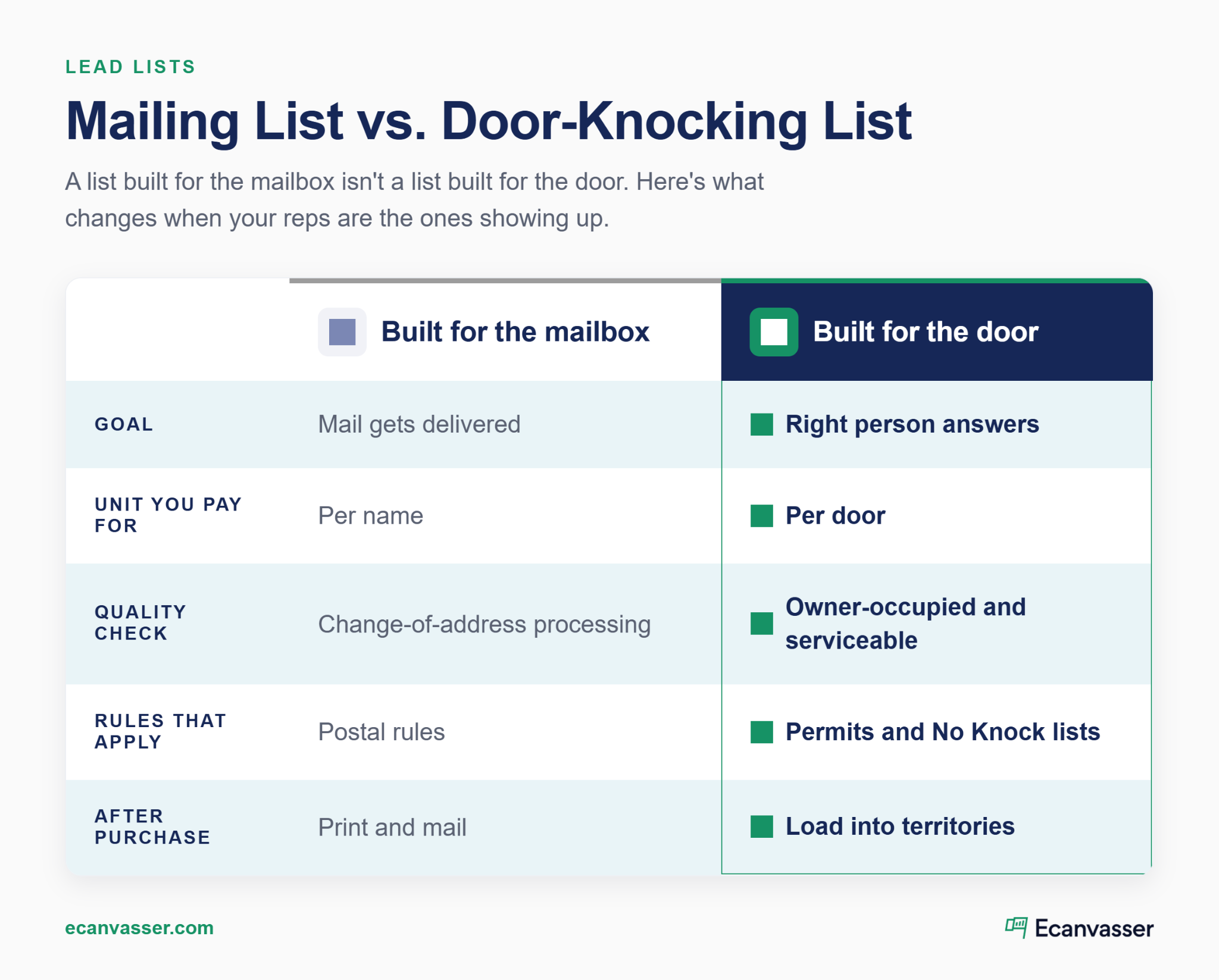
These three words get used interchangeably. At the door, they mean different things:
The gap between owner and occupant is bigger than you might think. The US homeownership rate was 65.0% in Q2 2026, and renter-occupied units numbered about 46.8 million (U.S. Census Bureau, 2026). Roughly one in three households rents.
So ask every vendor one question. Is this record owner-occupied, or just owner-of-record? Absentee landlords show up on plenty of "homeowner" files, and your rep can't sell solar to a tenant.
Vendors price per name or per record. Your rep works per door. A household with three adults can count as three records, but it's still one knock.
Lead Prospector is a useful example of honest disclosure here. Its support documentation says each registered occupant counts as a separate lead, so a three-occupant household uses three credits. Demand that same clarity from every vendor you talk to. Then you can compare prices on the unit that matters.
You have four realistic sources, and most teams end up combining two or three. Score each one against the door test: accuracy at the address, freshness, and how easily it loads into territories.
Ownership is public record in US counties. Many counties offer GIS or parcel tools that export owner names and mailing addresses. If you've ever searched how to get a list of addresses in a neighborhood, this is the honest answer.
The trade-offs are real, though. Formats vary from county to county. Exports often give the owner's mailing address rather than the property address. And pulling a territory that crosses several counties is slow work.
Brokers compile records from many sources and sell them nationally. They're strong on coverage and demographic filters. Many also sell a new homeowner list built from recent deed transfers, which suits services people buy right after moving in.
Before you buy, check three things first:
Pricing gets its own section next, because it's where most buyers get surprised. If you sell solar, the same sourcing logic carries into your wider solar marketing.
Built-in data removes the import step entirely. Lead Prospector gives US commercial teams verified household data inside the Ecanvasser map. You filter and import records in your target areas. They land in your database and sync to the mobile app your reps already use.

The data refreshes every quarter. Updates don't apply to records you already imported, so the support documentation recommends a fixed quarterly re-import date. One limit to know up front: Lead Prospector is available to US-based commercial teams only.
Your best list may already be sitting in your system. Past customers, quotes that didn't close, and every door status your reps have logged are first-party data you control.
Start by targeting the streets around recent installs, where neighbors have already seen your work. Exclude any house already marked "not interested," so reps don't waste a knock. Then send reps back to "not home" doors on a different day or at a different time.
Every vendor quotes differently, so a single number won't help you much. Use a framework instead. After a pilot, convert each quote into cost per workable door, which the final section shows you how to measure. A cheap list with a high miss rate often costs more per door than a pricier one that holds up.
You'll see three pricing models:
Watch the counting unit in every model. Lead Prospector counts credits per occupant rather than per house, and you won't see the number of houses until after import. Other vendors count names the same way, with less disclosure.
I've watched teams celebrate a cheap per-name price, then realize they bought three people at every address. The number that matters is what you paid for each door a rep could actually work.
The sticker price isn't the full cost. Many files are licensed for limited use. DirectMail.com, for example, separates two-time usage from unlimited use within 12 months.
That matters more for you than for a mailer. Door-to-door teams rework the same streets for months, so a two-use license can run out before the territory does. Then add refresh costs. A list bought once decays, so budget for quarterly re-imports or re-purchases. A monthly allowance like Lead Prospector's spreads that cost across the year.
A vendor can promise high accuracy. Your reps will find the real number in a week. Accuracy only shows up at the door, so build a short process to measure it before you commit.
Buy or import one small territory before you commit to a county or a state. Have reps work it for a week or two and log a status at every door.
Keep the pilot small enough to finish, but big enough that one bad street can't skew the result. Use your usual reps, your usual hours, and your usual script. You want to test the list, not the team.
Then count the misses: wrong owner, vacant, renter, or outside your service area. That share is the list's real error rate. It's also the number to compare vendors on, since every vendor's marketing says roughly the same thing.
Apply these filters before a single territory gets assigned:
Run the filters in that order. Owner status removes the biggest block of unworkable doors, and your service map catches what's left. Vacant homes are harder to filter in advance, so let the pilot flag them.
Multi-unit buildings need their own handling, with unit-level records and access planning. Apartments and buildings tools help here. Any decent field sales tool should let you filter on all three.
Owners sell. Renters move out. A list goes stale quietly, and reps notice before managers do. Set a fixed refresh rhythm instead of waiting for complaints. Quarterly works well, and it matches Lead Prospector's release cycle. Put the date on the calendar and treat it like any other recurring operations task. The source and date tags from your import make it easy to see which records are oldest.
"Many teams put effort into initial list building or turf cutting, then don't revisit it. Campaigns run on static lists, with no mid-campaign optimization, and high-value areas aren't prioritized dynamically. Good field sales is iterative. You adjust daily based on live data." Aoife Murphy, Customer Success Manager, Ecanvasser
List vendors cover mail rules. Your reps answer to a different set: local solicitation ordinances, phone rules if you call the list, and privacy laws that shape what data exists. Rules vary by city and state, and this isn't legal advice. Here's what to check.
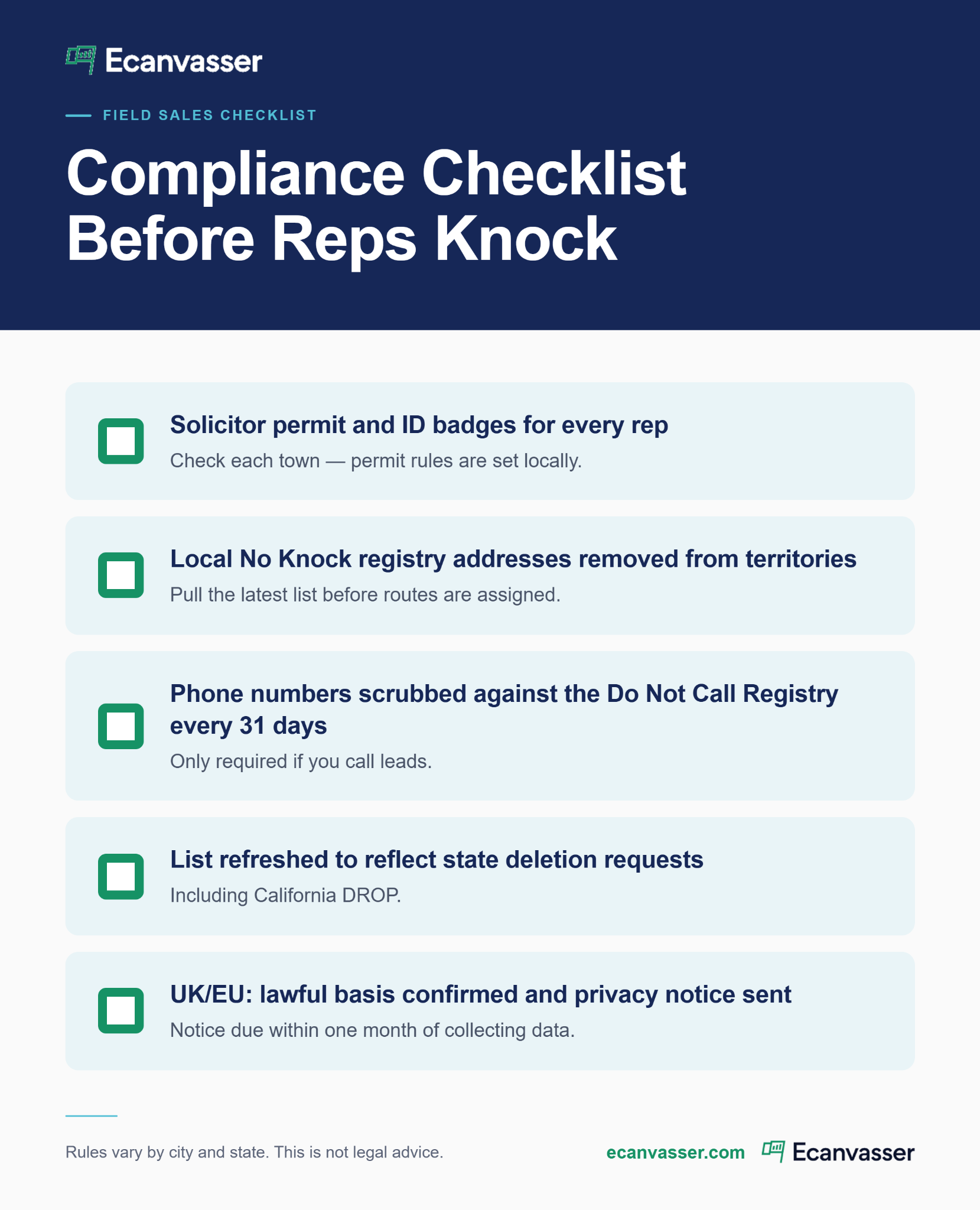
Many US towns require commercial solicitors to get a permit and an ID badge. Some also keep a "No Knock" registry of addresses reps can't visit.
La Vergne, Tennessee is a clear example. Commercial solicitors there need a permit and ID badge, and they must print the city's No Knock list on the first of every month. Religious, political, and charity groups are exempt.
The practical fix is simple. Load registry addresses into your territories as exclusions, so reps never see them.
The National Do Not Call Registry covers telemarketing calls. It doesn't cover knocks. But many homeowner lists arrive with appended phone numbers, and calling them brings the Telemarketing Sales Rule into play.
Covered sellers must sync call lists with the registry at least every 31 days, and fines can reach $53,088 per violation.
The safer route is to keep appointment-setting calls for people who asked for a follow-up at the door. That falls under the rule's inquiry exemption.
Most buyers haven't noticed this 2026 change yet. California's Delete Request and Opt-out Platform (DROP) lets residents send one deletion request to over 600 registered data brokers. From August 1, 2026 onwards, brokers must check it at least every 45 days.
For you, that means some California records will disappear from broker files over time. It's one more reason to refresh lists and compare record counts between pulls.
UK and EU teams mostly build and import their own address data under GDPR rather than buying US-style homeowner files. The bar for bought lists is high.
Under ICO guidance, you must give privacy information to everyone on a bought list within one month. A broker's assurances alone aren't enough. You also need due diligence on who compiled the data and when. The ICO notes this guidance is under review after the Data (Use and Access) Act. See our GDPR compliance page for how Ecanvasser handles data.
Ringtons, the UK tea and doorstep delivery company, replaced paper capture and a bespoke in-house app with Ecanvasser. Reps now record GDPR-compliant consent digitally at the door, replacing a paper process that left no auditable trail. The team also verifies addresses by latitude and longitude before reps visit. Read the Ringtons customer story.
Buying the list is the easy part. Here's where it turns into revenue or quietly goes to waste. Treat import, turf cutting, and assignment as one workflow.
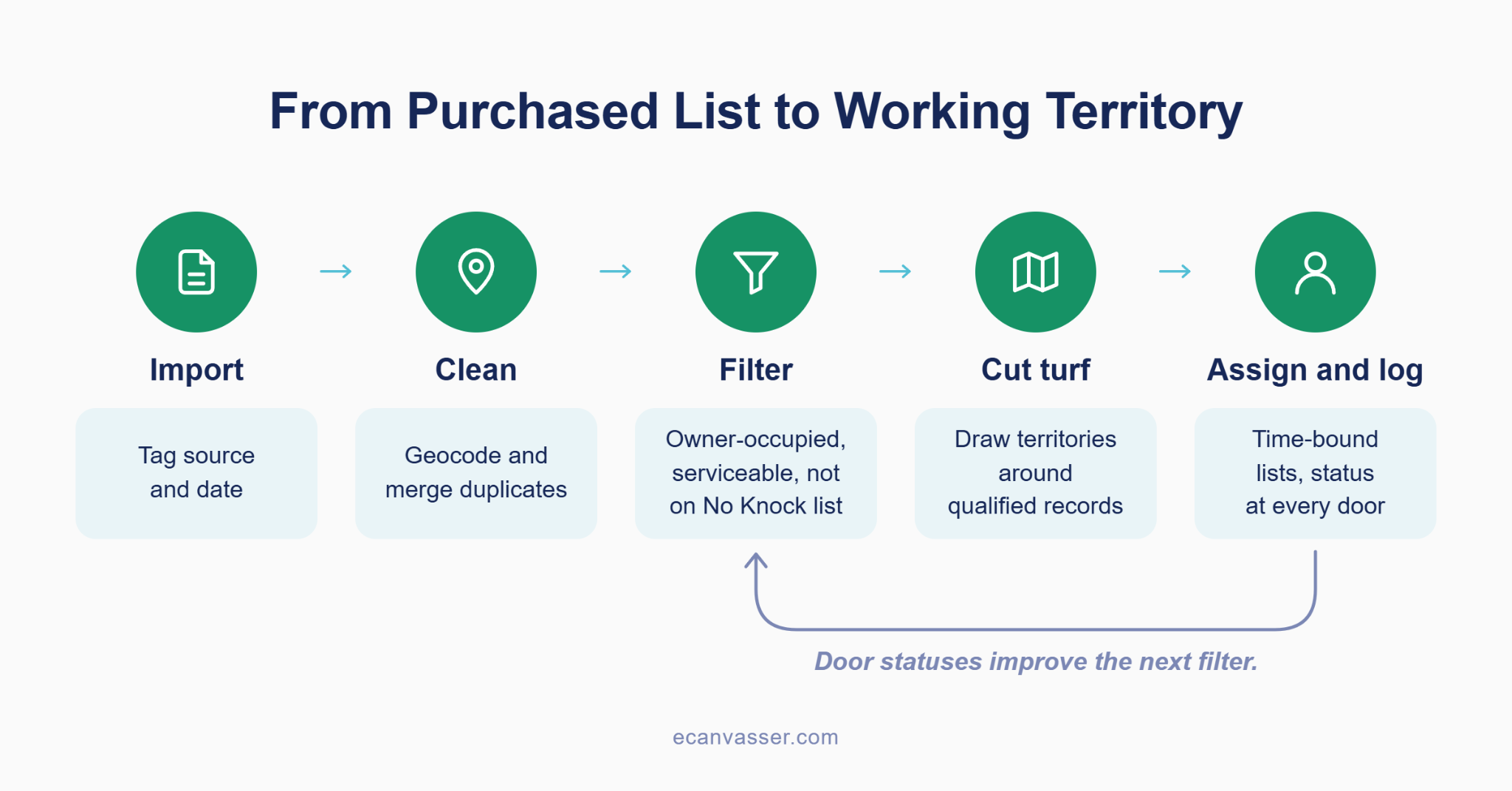
A raw file isn't a map yet.
Clean it first by following this process:
That last step pays off later. When you compare vendors, you'll know exactly which list produced which doors. The contact database keeps those tags filterable.
"Filtering on the map and data, with custom fields, survey questions, interaction statuses, and imports. Teams see that they have the power to do more with their data." Jay Lipscomb, Customer Success Manager, Ecanvasser
Zip codes and city lines are mail boundaries. Your reps walk streets. Draw territories around clusters of qualified records, your service map, and realistic walking density. Territory management lets you draw those shapes directly on the map. For keeping reps out of each other's turf, see our guide to territory integrity.
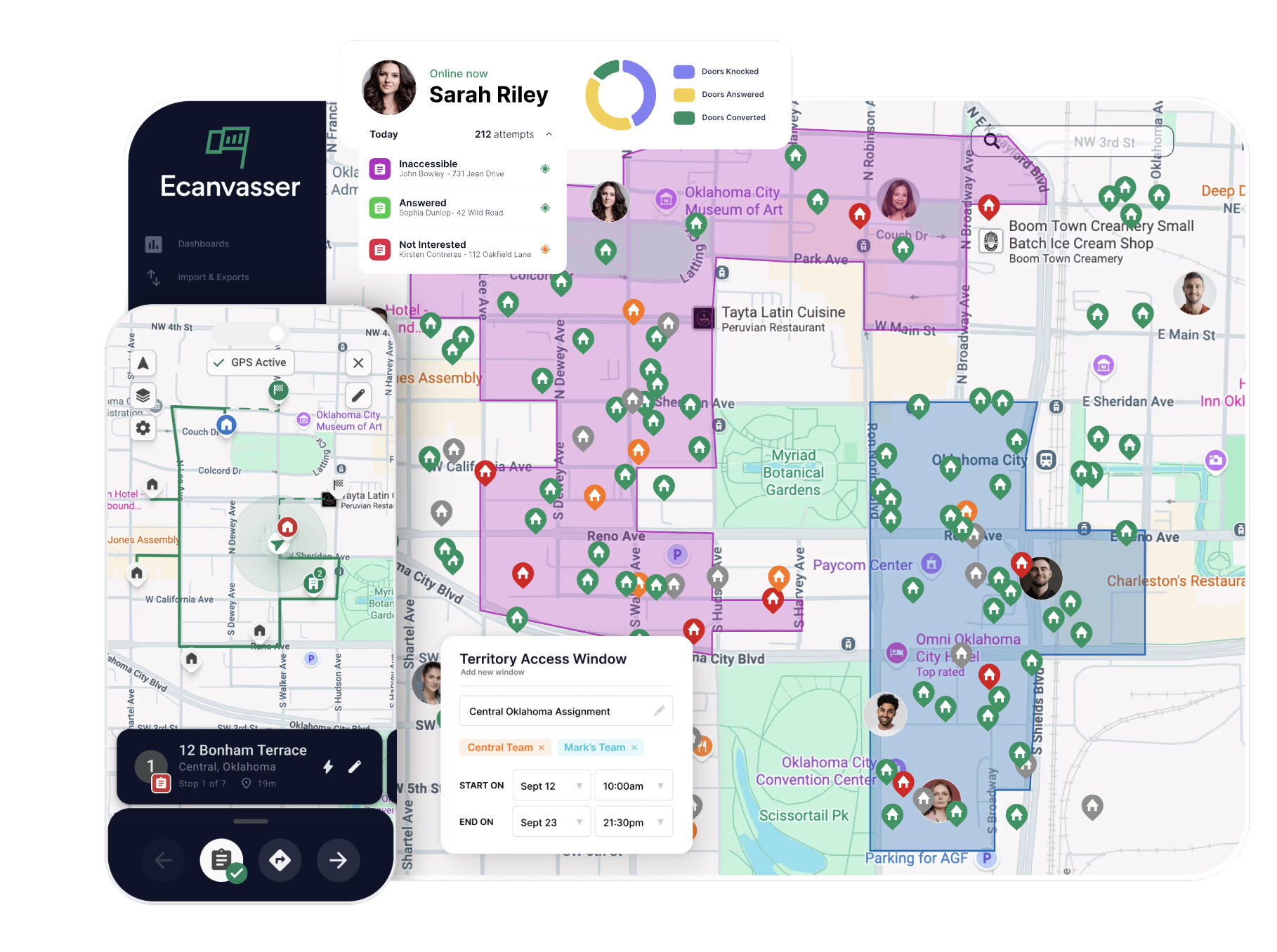
Lightning Fibre, a UK full-fibre broadband provider, needed reps to visit only homes on its network and stop knocking the same properties twice. With Ecanvasser, the team builds and assigns territories only from areas it can serve. It can also see exactly which doors were knocked and when, so follow-ups land at the right time.
A list stays useful only if every door gets a logged status. Assign each territory to a rep or team for a set window with time-bound lists. Lists stop sitting unworked or getting covered twice. Every status a rep logs, from "not home" to "lead," becomes the first-party data you'll mine next quarter.
"One of the biggest upgrades is shifting from manual list sharing to clearly defined assignments by user, team, and time window. It eliminates overlap and missed areas, creates accountability because everyone knows what they should be working on, and removes the admin of manually reassigning or cleaning up lists." Aoife Murphy, Customer Success Manager, Ecanvasser
Is the list working? Your vendor can't answer that. Your door statuses can.
Run this scorecard after the pilot and every month after:
Track the workable-door rate per source, using the tags from your import. After two or three months, you'll know which vendor actually earns its price. Pair it with your door knock-to-close ratio and track how fast new leads get a visit.
A residential solar installer bought a county-wide homeowner file and split it across six reps. In two weeks, close to a third of the doors were renters, vacant homes, or roofs that couldn't take panels. The team re-filtered for owner-occupied single-family homes, and wasted knocks fell the following week. Cost per appointment dropped even though reps knocked fewer doors.
The best list quality report I've seen never comes from the vendor. It's the share of doors your reps mark as wrong owner, vacant, or not serviceable in the first two weeks.
You don't need a county-wide file to find out whether a list works. Pick one source, one pilot territory, and one scorecard. Scale only the list that earns it, and drop the ones that don't.
If you run a US commercial team, you can test this inside Ecanvasser with Lead Prospector and its 10,000 leads per month. UK and EU teams can import their own data into the same territory workflow. Either way, your reps start knocking doors you've already checked, and your scorecard tells you when to scale.
Talk to Sales or start a 7-day free trial.
{{faq-1}}
{{faq-2}}
{{faq-3}}
{{faq-4}}
Ready to transform results for your team? Explore our field sales software.
Start with your county's GIS or parcel tool, which often exports owner names and mailing addresses for free. For larger areas, a data broker or a platform tool like Lead Prospector (US only) is faster. Whichever source you use, filter for owner-occupied homes and your service area before reps knock.
A new homeowner list contains people who recently bought a home, usually built from deed transfers. It suits services buyers need right after moving in. For door-to-door teams, run it through a pilot territory first. Fresh records are valuable, but you still need to confirm the buyer actually lives there.
Generally, yes, but local rules apply. Many towns require solicitor permits and ID badges, and some keep No Knock registries you must exclude. If you phone numbers from the list, Do Not Call rules apply too. Rules vary by city and state, so check each town before reps go out.
Ecanvasser’s real-time tracking completely transformed our field operations. Through the dashboard, we can plan efficient routes, customize interactions, and monitor our canvas stops in real time to support our team the second they need help. The "verified drops" feature adds an extra layer of accountability, while the reporting tools make it seamless to track hourly visit rates and optimize performance on the fly.




Scale your operations, empower your reps, and deliver predictable, profitable growth with Ecanvasser.